

Acnoo
Products
Overview
Pricing
Documentation
FAQ
Change Log
Login
Acnoo
Acnoo

Acnoo Software is a leading technology company specializing in software development, mobile app development, and UI/UX design. We deliver innovative, scalable, and user-friendly solutions tailored to meet modern business needs.

Envato Achievements

Featured AuthorTop Monthly AuthorElite AuthorAuthor Level 87 Years of MembershipCollector Level 1Milestone MemberTrendsetterWeekly Top Seller

Company

  • Case Studies
  • Terms & Conditions
  • Privacy Policy
  • Contact Us
  • Why Acnoo
  • About us

Quick Links

  • Service
  • All Products
  • Hire Us
  • Refund Policy
  • Blogs
  • Support
  • Affiliate Program

Products

  • PAPOSPro – All-in-One SaaS POS, Inventory, HRM, ERP & Online Store with Flutter AppNew
  • RBRentPro Best Property & Rent Management Software with Laravel Admin with Flutter AppNew
  • GSGrocery SaaS Platform Flutter Grocery selling App with Laravel Admin Panel
  • GEGarments ERP Apparel & Textile Industrial ERP Software
  • SGSMSpro Gateway Turn Your Android Phone into a Powerful SMS/MMS Gateway (SaaS)
  • IHInfluencer Hiring Marketplace Flutter App Laravel Admin Panel
  • PSPOSpro SaaS – 16+ Add-On Modules BundleNew
  • RARestaurant App - online Food Ordering Table Booking Restaurant App with Laravel Admin Panel SaaSNew
  • APAcnoo Pharmacy - SaaS Pharmacy Management Software & Flutter App with Admin PanelNew

Copyright © 2026 Acnoo, all rights reserved.

HomeCartAccount

We use cookies to improve your experience and measure traffic. You can accept all cookies or reject non-essential ones. For details, see our Privacy Policy.

POSPro docs
Installation & Deployment
Admin Panel
  • Getting Started
  • Requirements
  • Download Project from Envato
  • Creating Database
  • Uploading Files
  • Installation Wizard
  • Default Password
  • Dashboard
  • Advertising Section
  • Business List
  • Business Category List
  • Subscription Order List
  • Custom Domain List
  • Plan List
  • Staff List
  • Subscription Report
  • Message List
  • CMS Manage
  • Roles & Permissions
  • Add ons
  • Setting
  • Mail Configuration / SMTP Setup
  • Hostinger Panel
  • Gmail
  • Admin Change Logs & Update Guide
  1. Home
  2. Products
  3. SaaS Software
  4. POSPro
  5. Documentation
  6. Business List

Business List

This appears to be a screenshot of a business list page. Business list functionalities typically allow users to collect and organize information about businesses. By clicking the "View" button, you can see the details of each business. You can also create a new business by clicking the "Add New Business" button. Below, we'll describe how you can create a new business.
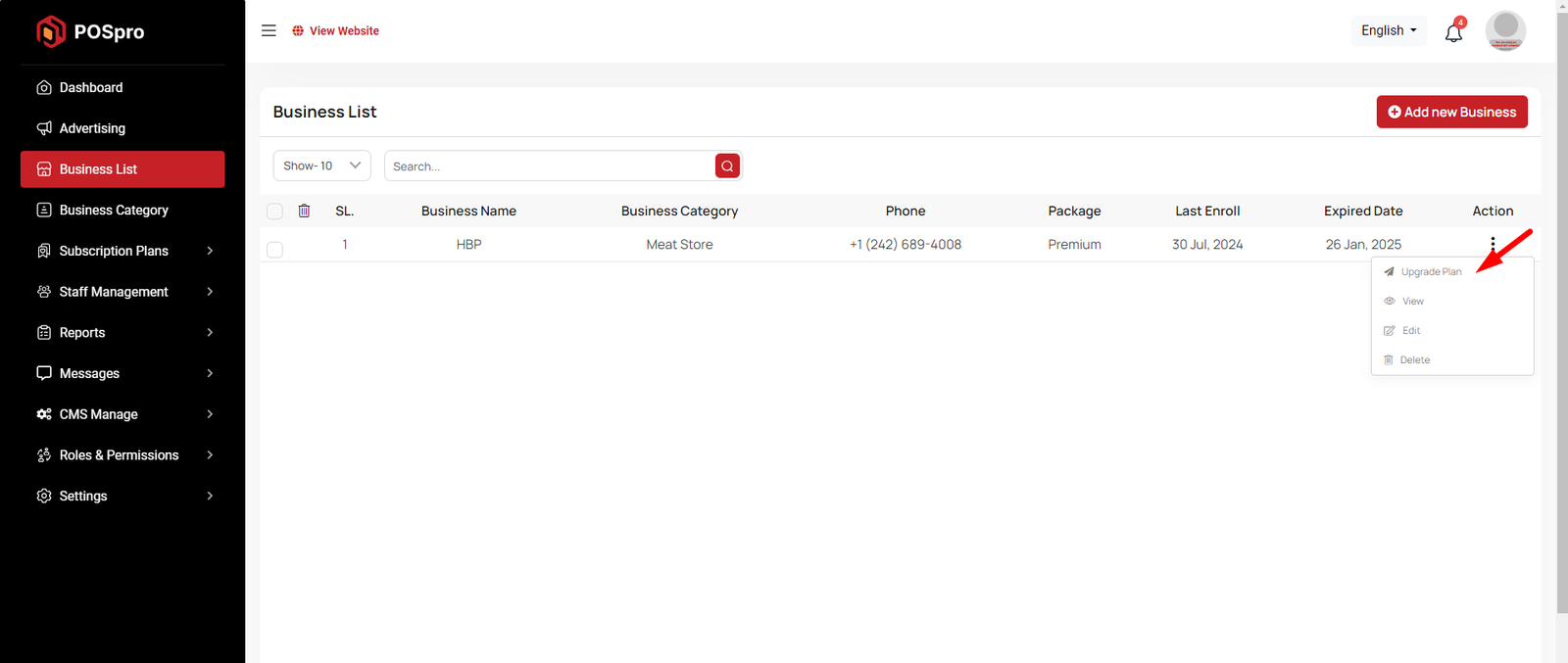
Upgrade Plan

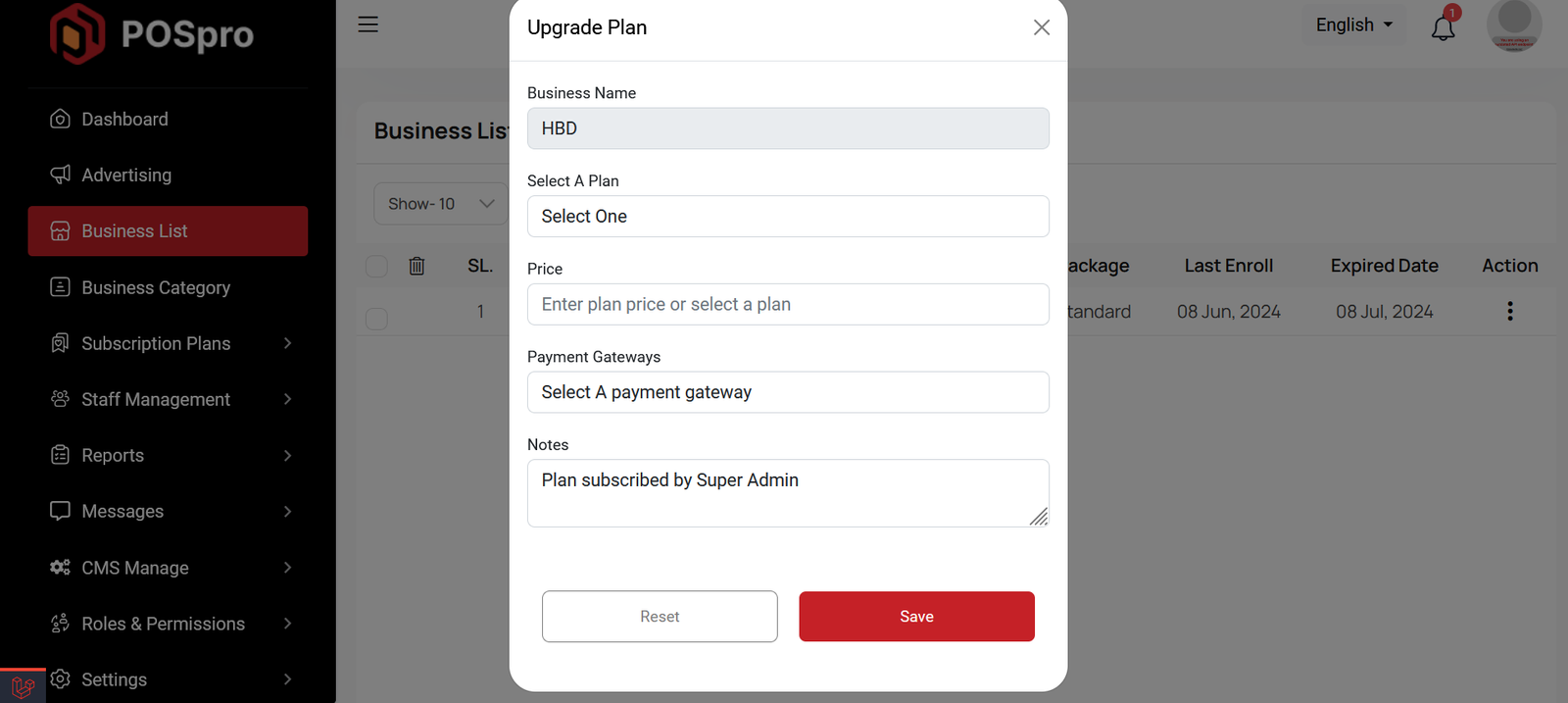
If you need to upgrade the plan for any business, click on the "Upgrade Plan" button. You will likely see a popup for this. Here, you can update the plan, gateway, price, and notes. When you select a plan, the price input field will automatically fill in according to the selected plan, but you can also change the price manually. If desired, you can add a note by filling in the notes input field.
Create Business

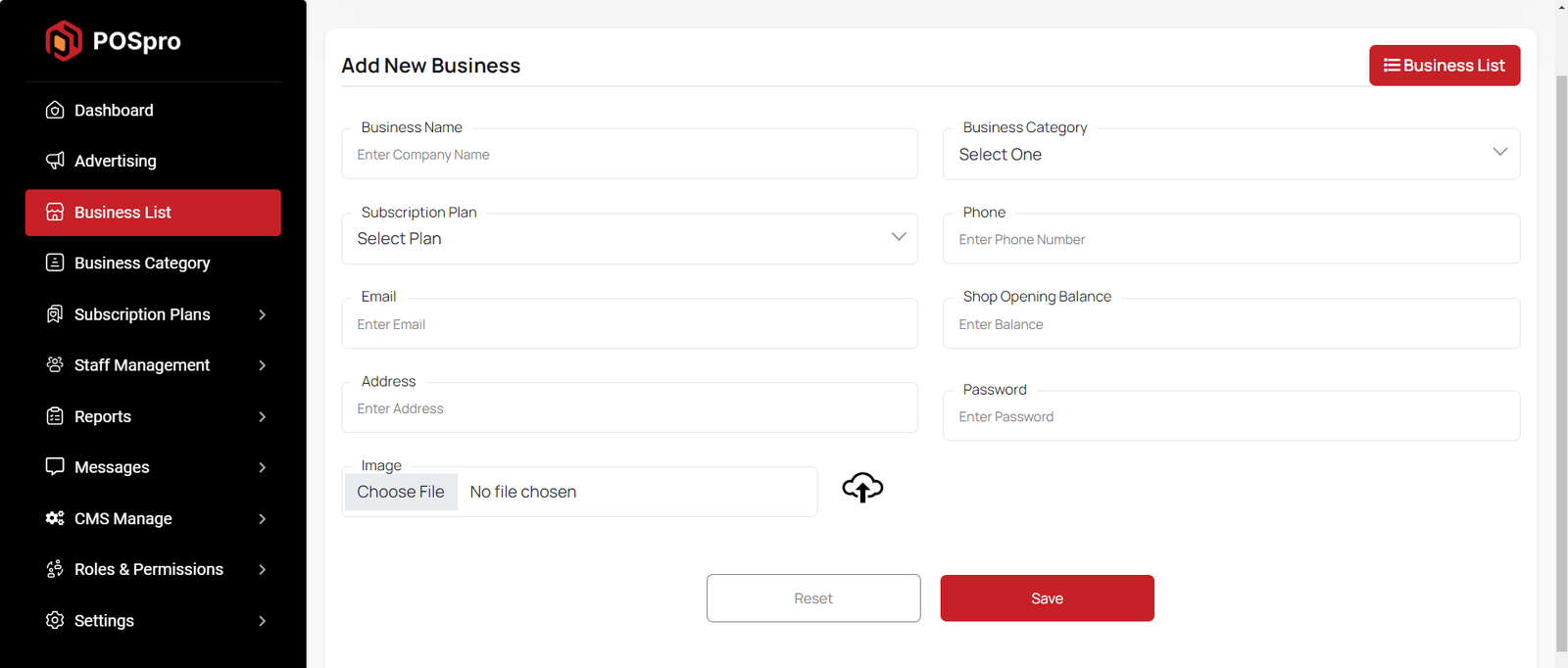
By clicking on the "Add New Business" button, you can create a new business. You will need to fill in the necessary fields. Here is the screenshot of the create business page.
Was this guide helpful?

On this page

  • Upgrade Plan
  • Create Business
Stuck?Our team can set it up for you.Contact support